A metal button with a sealed face can be attractive for equipment exposed to frequent cleaning or repeated operation. Its appearance, however, says little about what happens electrically when someone presses it. A piezoelectric push button switch and a conventional mechanical button may fit similar panel openings while producing very different signals.
Before selecting either option, define the command, operating conditions and required response. This guide explains the piezoelectric principle, the limitations behind common marketing claims and the checks that matter for equipment buyers. It also uses a YIJIA metal push button as a mechanical comparison, without treating every metal actuator as a piezo device.
How a piezoelectric push button works
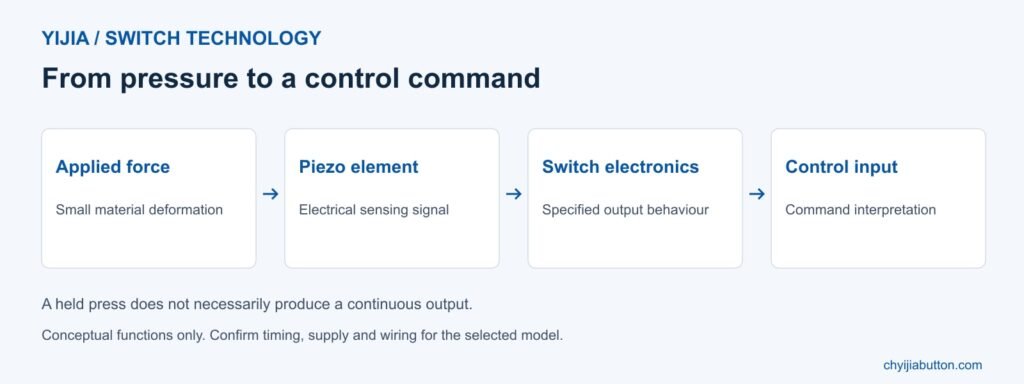
Piezoelectric materials generate electrical charge when mechanically stressed. In a piezo button, pressing the surface transfers force to a sensing element. The small deformation produces a signal that the associated electronics can interpret and convert into a switching output. The operator does not need the travel associated with a conventional contact mechanism.
That does not mean nothing moves at all. Material deformation is part of the operating principle, even when the movement is too small to notice. The useful distinction is the absence of a conventional moving contact assembly in the sensing mechanism, rather than an absolute claim of zero movement throughout the device.
Piezo sensing also differs from capacitive touch. A capacitive interface detects a change in capacitance, whereas a piezo interface responds to mechanical stress. Infrared detection uses light. A smooth surface, an illuminated ring or the word touch in a description does not establish which technology a particular button uses.
Understanding the output before designing the circuit
A common piezo switch produces a pulse when actuated. Holding pressure on its face does not necessarily keep the output active indefinitely. Pulse behaviour can depend on the switch design and the applied force. Some products provide extended signals or electronically maintained functions, so the exact output specification is essential.
Compare this with a mechanical momentary contact, which normally remains operated while its actuator is held. Replacing it with a pulse output can change the equipment’s behaviour. A controller may miss an unsuitable pulse or interpret it differently from a sustained command. Check input requirements and timing before approving a replacement.
Ask for the output circuit and timing information, not just a description such as normally open. Confirm voltage and current limits, any polarity requirements, and compatibility with the receiving input. Electronic outputs can have characteristics different from physical contacts. The complete interface needs verification even when both products are described as switches.
YIJIA piezo switching principle • Conceptual functions, not a model wiring diagram
Power consumption and illumination
The piezo element generates a sensing signal from applied force, but this is not a source of useful power for the controlled equipment. Some piezo switch designs operate without a separate supply for their switching function. Other functions, including electronic latching, may require external power. Check the selected configuration rather than generalising.
LED illumination has its own supply requirements. Confirm lamp voltage, connection details and control method independently of the switching output. A light may indicate available power, acknowledge an input or report a confirmed equipment state. Those meanings depend on the circuit and cannot be inferred from the button’s appearance.
Avoid assuming that piezo technology always consumes less energy than a mechanical switch. A basic passive mechanical contact does not need an electronic supply to change state. Compare total consumption for the actual assemblies, including lamps and interface electronics, if standby demand or battery life matters to the equipment design.
Sealing materials and environmental protection
Piezo buttons can use a continuous metal operating surface that supports effective sealing and convenient cleaning. That construction can be valuable where gaps around an actuator would complicate maintenance. However, ingress protection belongs to a tested product and installation, not to the piezoelectric principle itself.
Check the declared IP rating, its scope and mounting conditions. Protection at the front of the panel may not cover rear connections. Immersion, water jets and intensive cleaning represent different exposures; do not infer approval for one from a statement about another. Confirm the requirements of the complete enclosure assembly.
Material selection also matters. Identify the housing alloy, finish, seals and compatibility with cleaning agents. A stainless steel face is not proof of universal corrosion resistance. Outdoor use can involve sunlight, temperature changes and condensation as well as rain. Evaluate those conditions separately instead of relying on the word waterproof.
Durability and operator feedback
Eliminating conventional contact wear can support long operating life, but no switch should be described as unable to fail. Electronics, bonds, sealing and connections remain part of the assembly. Compare endurance claims under their stated test conditions and ask whether those conditions resemble the intended operating duty.
A piezo face generally provides little obvious travel, so the interface may need another form of feedback. An indicator or audible response can help an operator know that a press registered. Decide what happens if a user presses repeatedly because the first response was unclear, and test that sequence during development.
Mechanical feedback can still be valuable where operators work without looking directly at the panel. Glove use, finger access, required force and actuator spacing affect both technologies. Piezo sensing does not depend on bare finger capacitance, but the chosen assembly should still be evaluated with the actual protective gloves and operating technique.
Applications that justify evaluating piezo controls
Consider piezo technology when a sealed operating surface, limited travel or frequent cleaning addresses a specific equipment requirement. Commercial interfaces, local control stations and public equipment may benefit from those characteristics. A suitable application still needs a compatible output, deliberate operation and clear feedback.
Do not assume that a general purpose piezo button is approved for medical, automotive or hazardous location equipment. Those uses can introduce additional qualification and system requirements. Similarly, impact resistance and resistance to tampering need their own evidence; a metal face does not automatically establish a tested anti-vandal classification.
For safety functions, select a device and architecture appropriate to the required function. An ordinary pressure sensing button is not automatically an emergency stop, even if its surface is coloured red. Define failure behaviour, reset conditions and verification requirements as part of the equipment design rather than relying on an attractive actuator.
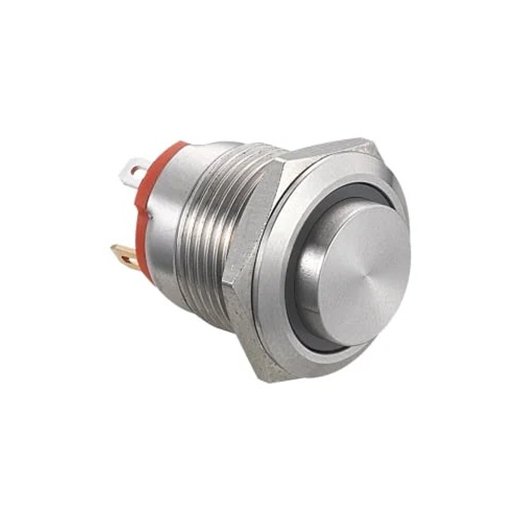
YIJIA YJ-GQ16 short type metal push button • Official product photograph
Comparing a YIJIA mechanical metal option
YIJIA’s YJ-GQ16 short type product page describes a nominal 16 mm installation size, momentary operation and a 1NO contact. It lists a stainless steel actuator and screw or pin terminal options. These are useful details when considering a compact mechanical metal button; they do not establish piezoelectric operation.
For a design that needs physical actuator movement and a defined contact state during pressing, compare the selected YIJIA configuration with the circuit requirements. Verify mounting dimensions, rear clearance, electrical duty and termination. Where illumination is required, confirm the lamp specification and the available model combination separately.
If piezo sensing is essential, state that explicitly in the enquiry and request documentation for a suitable available model. Do not substitute an ordinary metal switch on the basis of appearance. Keep the technology, output behaviour and intended command clear so purchasing and engineering evaluate the same requirement.
Preparing a sample evaluation and enquiry
Provide the supplier with the panel drawing, operating environment, output requirements and expected use. Include the permitted mounting depth, cleaning method, illumination needs and quantity. Ask which ratings apply to the proposed assembly and what accessories or wiring are included. Avoid building a specification from unrelated catalogue photographs.
Evaluate deliberate presses, prolonged pressure and repeated operation in the intended panel. Check whether the controller reliably recognises the output and whether indication matches the defined command. Review startup behaviour for powered versions. Record the approved ordering code and drawing so subsequent deliveries reproduce the tested configuration.
Include maintenance staff in the evaluation. They should be able to identify the part, inspect its connections and understand the expected response under normal operating conditions without guessing from the front surface. Document how a failed indicator is distinguished from a missing command, and how the equipment is isolated for replacement. A clear service procedure helps prevent an apparently simple button change from introducing a different output type or incompatible lamp supply later in the equipment’s service life.
FAQ
Is a piezo button the same as a capacitive touch button
No. Piezo sensing responds to mechanical stress, while capacitive sensing measures a capacitance change. Both can have smooth operating surfaces. Identify the sensing principle from technical documentation rather than interpreting the enclosure style or illuminated ring.
Does holding a piezo button keep it switched on
Not necessarily. Many designs generate a pulse, while other versions offer extended or maintained output behaviour. Check the timing specification and the receiving circuit. Never assume that a piezo replacement behaves like a held mechanical contact.
Do all piezo switches operate without external power
No. Some switching versions do, but electronic functions may need a supply, and LEDs require an appropriate source. Confirm the complete model’s connection and power requirements. The sensing element does not power the equipment being controlled.
Are piezo buttons automatically waterproof
No. Protection depends on the complete product, sealing and installation. Confirm the specific rating and whether it covers the panel front or other parts of the device. Also check rear connections and compatibility with the expected cleaning exposure.
Can I replace a mechanical button with a piezo switch
Only after checking mechanical fit, output behaviour, electrical compatibility and the required control function. Similar dimensions are insufficient. Test the proposed switch with the receiving circuit and retain the approved configuration before making a production change.
Description: Learn how piezoelectric push button switches work. Compare output signals, sealing and feedback, and assess a YIJIA mechanical metal button alternative.
In the world of industrial equipment, reliability and durability are paramount. Among the various components critical to the performance of industrial machinery, push button switches play a vital role. As an essential element in controlling and operating machinery, the durability and lifespan of industrial push button switches are crucial factors that affect not only the […]
A red push button is easy to notice, but its colour does not tell you what happens inside the switch. It may provide a momentary command, hold a contact in a changed state or combine switching with illumination. Choosing the right device starts with the required control function, not the colour of its head. For […]
In the contemporary industrial field, metal button switches are no longer just simple control devices, but have become an important part of industrial automation and intelligence. Known for their reliability and stability, these rugged pushbutton switches are widely used in production lines, control systems, and hazardous environments. This article will conduct an in-depth study of […]
We use cookies to enhance your browsing experience, serve personalised ads or content, and analyse our traffic. By clicking "Accept All", you consent to our use of cookies.